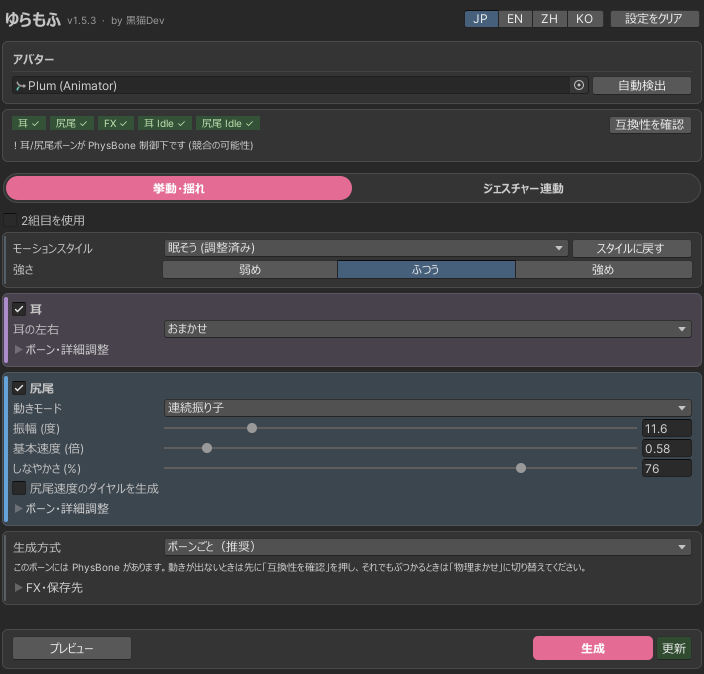
YuraMofu is a Unity Editor extension that builds idle and gesture-linked animations from your avatar's ear and tail bones. Check everything in the preview, then generate — it can add the layers to your FX Controller for you.
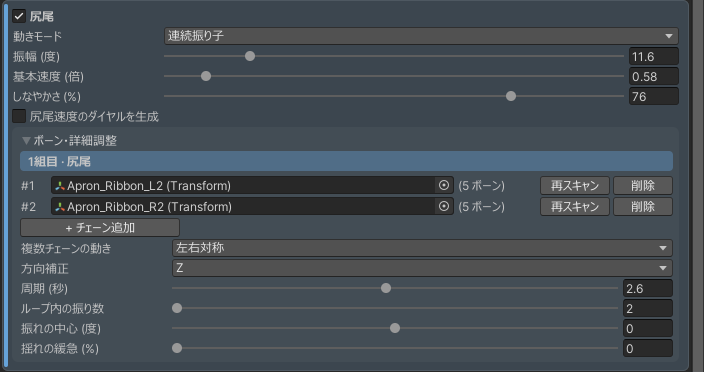
The tail can now take more than one bone chain, so twin tails, apron ribbons and other swaying parts can move together.
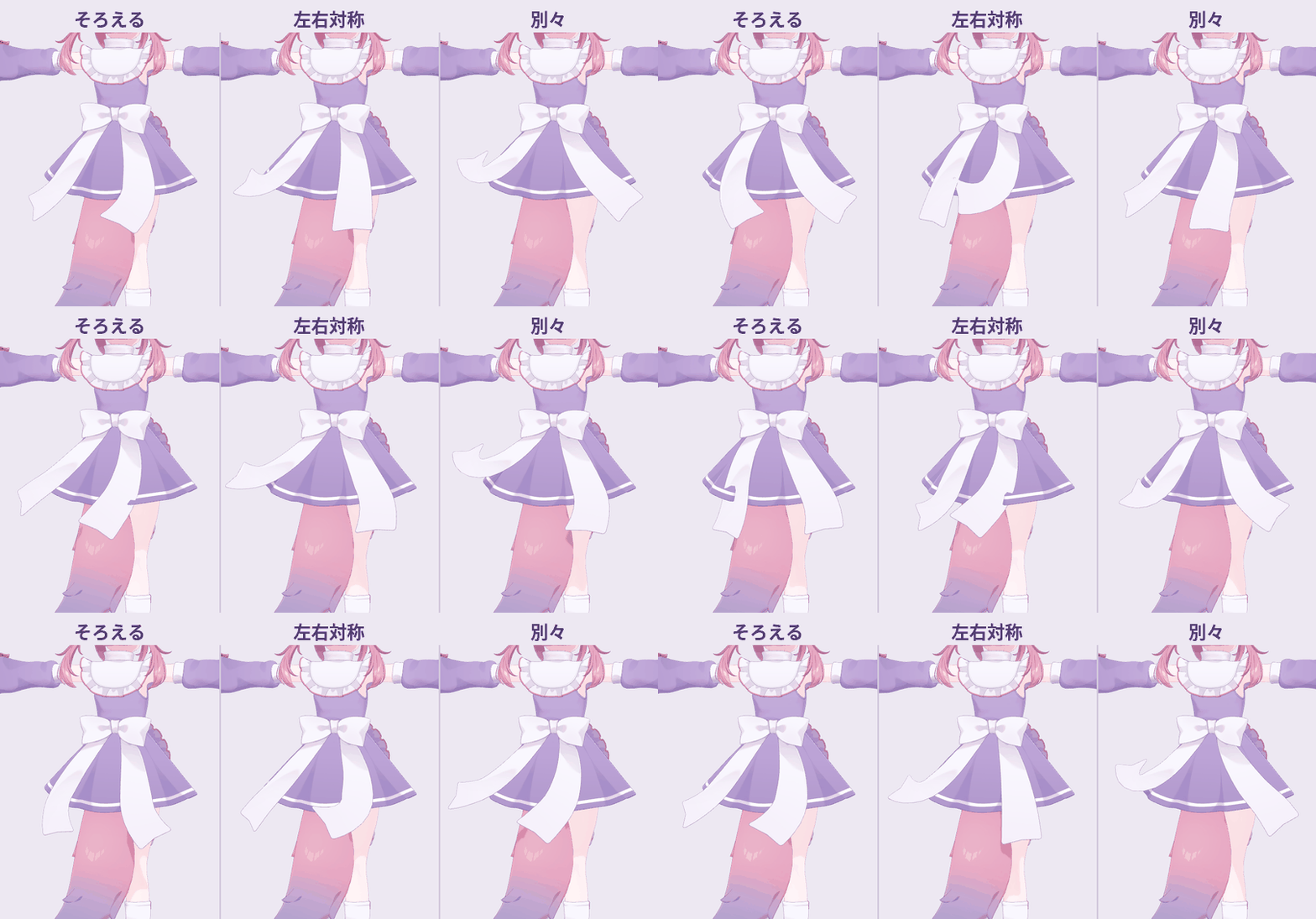
Both apron ribbons driven as one tail (Together / Mirrored L/R / Separate)
More tail chains
Add chains with + Add Chain under Bones & Details. Strength, speed and the other settings are shared by every chain. With two or more, Multiple Chains chooses how they move: Together (same direction), Mirrored L/R (mirror image of the first) or Separate (own timing).
Listen
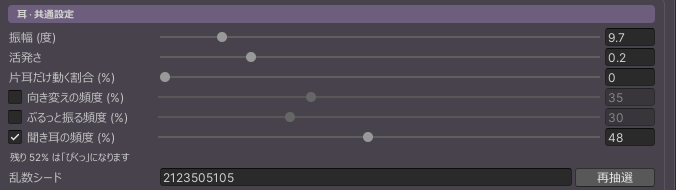
Now and then the ears draw up, hold for a moment and settle, as if listening for something. Set it like Swivel and Shake, with the checkbox and Frequency (%). The enabled moves share up to 100%; the rest are twitches.
If you change values after choosing a style, the style row shows "adjusted". Restore style brings back the style's values, and choosing another style asks before overwriting your adjustments.
Each style now always uses its own rhythm, and Activity speeds it up or slows it down relative to that. Nervous now perks the ears up and has them take turns looking outward.
Bones are detected automatically when you assign an avatar.
The confirmation before Generate and Update also shows the FaceEmo Write Defaults warning.
Uninstall now lists what it will remove and asks first. It also removes the tail speed dial (FX parameters and menu item) and the clips used to pause idle motion during gestures.
After updating the tool, run Update to apply the changes to existing output.
New in v1.5.2
A warning for FaceEmo setups and a more natural tail motion.
If FaceEmo is applied with "Disable WD (Expression Priority)", the tool now shows a warning. This can make the ears and tail sink in or twist. In FaceEmo, choose "Unify WD (Gimmick Priority)" and apply it to the avatar again.
If the FX itself has Write Defaults OFF states, so changing FaceEmo alone will not help, the tool says so as well.
With the tail set to Sometimes, each swing now dies down gradually instead of stopping dead.
Fixed: adding the speed dial to an avatar that still uses VRChat's default Expressions Menu and Parameters removed VRCEmote and the face blend parameters.
The tail motion and speed dial fixes reach existing output when you run Update after updating the tool.
01Getting started
Requirements: Unity 2022.3 LTS or later (Windows Unity Editor). Adding to FX, Gesture Link and the tail speed dial need the VRChat SDK3 Avatars; basic Animation Clips can be generated without it.
Import and open
Import the unitypackage and open 黒猫Dev → YuraMofu (ゆらもふ) → Open Window. Back up your project first.
Pick the avatar and Auto Detect
Put the scene avatar in the Avatar field and click Auto Detect. When ears, tail and FX show ✓ in the status bar, you are ready. Always check the result and fix bones in Bones & Details if needed.
Choose a style and strength
In the Idle Motion tab, choose a motion style and strength, then adjust the ears and tail.
Preview
Click Preview to see the motion in the Scene view. Nothing is written to assets or FX until you generate.
Generate / Update
Generate the first time; Update when changing existing output. A list of files and layers to be added or replaced is shown before anything is written.
Idle Motion tab
02Idle Motion
Motion style and strength
Calm
Natural
Lively
Sleepy
Nervous
Silly
Whimsical
Strength is Soft, Normal or Strong. Choosing a style sets the ear and tail details to that style's values. If you change values by hand, the style row shows "adjusted"; Restore style brings the style's values back. Whimsical adds long stillness broken by single, mostly one-ear twitches, and an off-centre tail swaying at an uneven tempo.
Ears
Ear L/R
Auto, Sync or Async. In Sync, Single-Ear Share sets how often only one ear twitches.
Motion types
By default the ears only twitch. Add Ear Swivel (turns slowly outward and holds), Ear Shake (flings the ear like shaking off water) and Listen (draws the ears up and holds for a moment). Each has a checkbox and a Frequency (%); the enabled moves share up to 100% and the rest are twitches.
Tail
Bones
Use + Add Chain to add more chains (twin tails, ribbons and so on). Multiple Chains chooses Together, Mirrored L/R or Separate.
Motion
Continuous or Intermittent.
Amplitude and base speed
1x is a 1.5-second cycle.
Suppleness (%)
Higher values calm the base and send the swing to the tip as a wave. 0 keeps the previous motion.
Swing Center and Tempo Variation
Swing around an off-centre point / vary the speed of each swing (Detailed Settings).
Tail speed dial
Turn on Generate Tail Speed Dial to change the idle tail speed with a dial in VRChat. At 0% the tail returns to its rest position and stops. Ear and Gesture Link speeds are unaffected.
Output mode
Bake Chain (Recommended)
Writes keys onto every bone in the chain. For ears and tails without PhysBone.
Physics-Friendly (Alternative)
Animates only the root and lets PhysBone carry the rest. Fewer keys and a softer result.
If the motion goes the wrong way, fix the axis with Axis Correction in Bones & Details. The defaults work for most avatars.
03Gesture Link (product version)
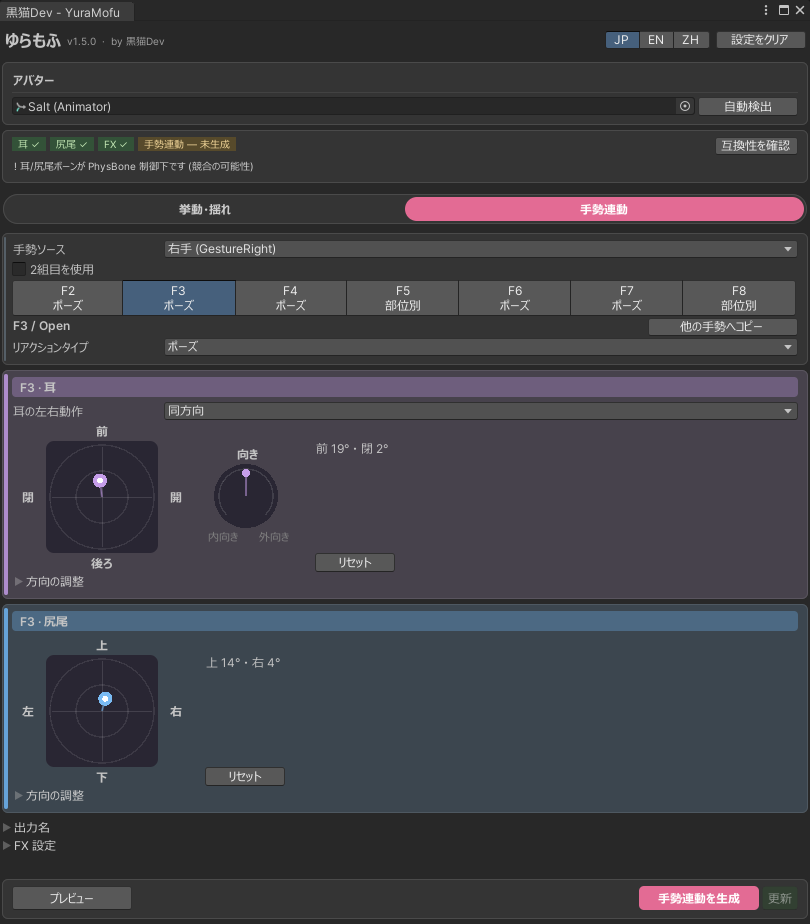
Set it up in this order: hand (GestureLeft / GestureRight) → F2-F8 → reaction type → ears and tail.
Gesture Link tab (F3 / Open)
Reaction types
None
The gesture does not move the ears or tail.
Pose
Tilts the ears/tail toward the direction set on the pad. Fist follows trigger pressure from 0 to 100%; other gestures show the full pose right away.
Continuous Motion
Repeats the chosen style's ear or tail motion while the gesture is held.
Per Part
Assign None, Pose or Motion to the ears and tail separately.
Setting the direction on the pad
Ears: the pad sets the tilt, the dial turns them in or outTail: the pad sets the tilt
The further from the centre, the bigger the tilt. Left/right is as seen from the avatar.
Drag the pad and dial to adjust; double-click to return to the centre (0).
For the ears, Same mirrors the motion on both ears, Opposite makes the other ear do the reverse. Left ear only / Right ear only move just that ear, and Separate L/R gives each ear its own pad.
Open Direction to type XYZ directly. Typed XYZ is used until you move the pad again.
With Fist selected, Pose Preview (%) shows each pressure level.
Pause idle during gestures
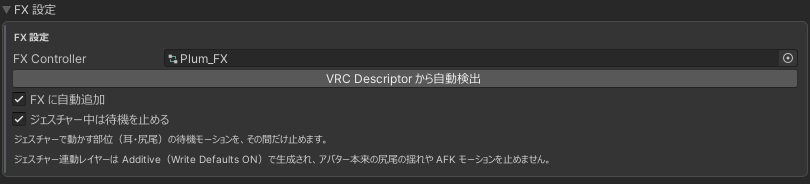
Found under FX Settings (on by default). While a gesture moves a part, that part's idle motion pauses. Turn it off to layer gesture poses and motions on top of the idle motion. It is set up from the layers in the FX, whichever of idle or Gesture Link you generate first.
FX Settings (F2 / Fist)
Copy To... copies the selected gesture's setup to another gesture or to all of them. The display name is not copied.
04Second ear/tail set
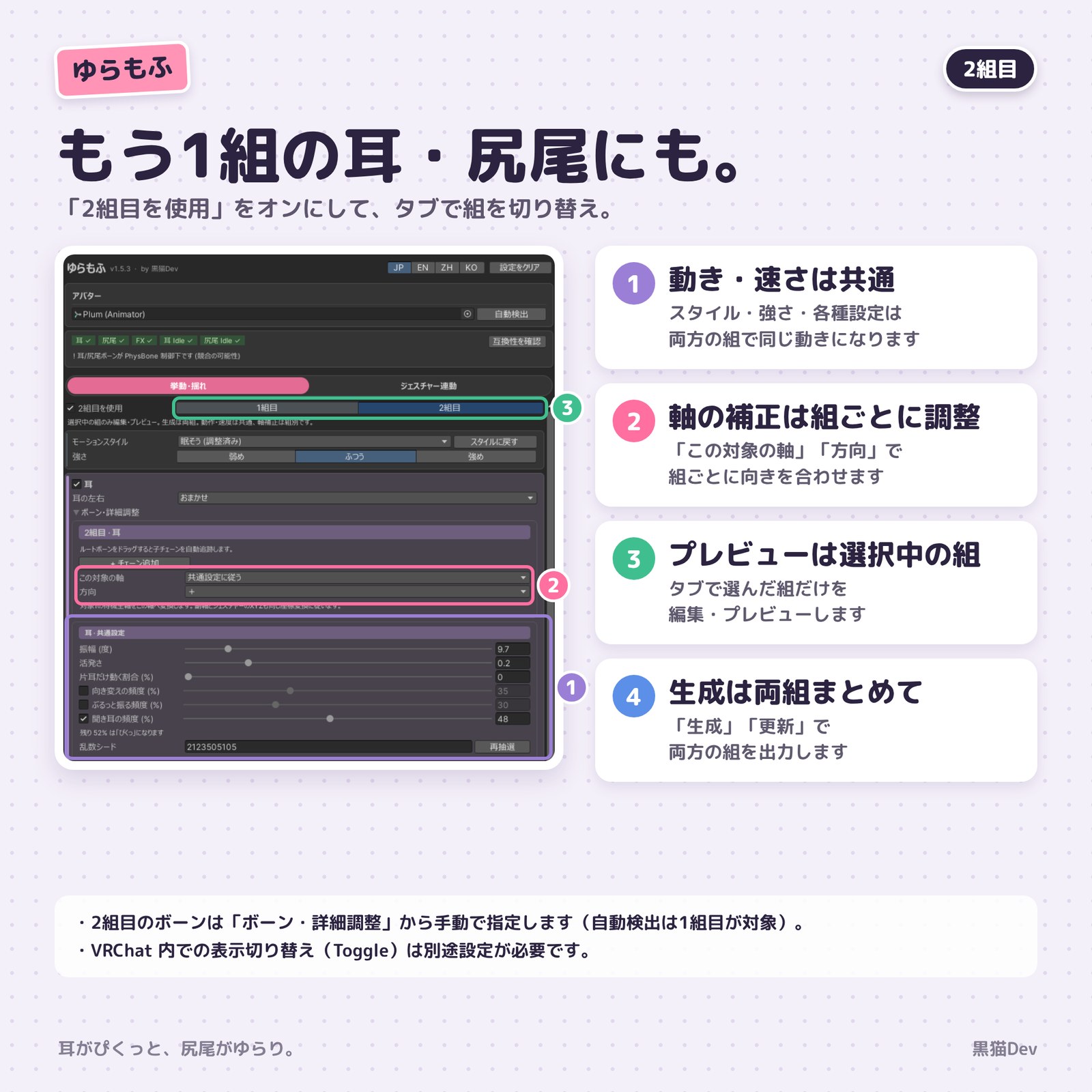
Turn on Enable second set at the top of each tab to switch between set 1 and set 2. Motion and speed are shared; only the axis correction is per set. Generate and Update output every enabled set.
Second ear/tail set
Assign the second set's bones by hand (Auto Detect covers set 1). This is not a way to give the two sets different motion or speed.
05Generating, updating and the FX Controller
Preview
Shows the motion in the Unity Editor. Changes are not written to assets or FX until you Generate or Update.
Generate
Creates new Animation Clips and YuraMofu FX layers.
Update
Applies the current settings to existing output.
Add to FX automatically
Adds layers that play the generated motion to the avatar's FX Controller. Idle and Gesture Link layers are additive (Write Defaults ON, fixed) and add on top of the avatar's own motion.
Save location and update notice
Set under Idle Motion → FX & Save Location.
Unity's Undo cannot fully restore Animator Controller layers. Review the confirmation list shown before generating, and back up if needed.
Uninstall: 黒猫Dev → YuraMofu (ゆらもふ) → Uninstall from Active Avatar lists what will be removed and, after you confirm, removes the layers, parameters and menu item YuraMofu added.
06FAQ
Does it work with PhysBone ears and tails?
Yes. Use Check compatibility in the status bar to check Is Animated and more. To leave the sway to PhysBone, use the Physics-Friendly output mode.
Can I use it with FaceEmo?
Generate FaceEmo first, then YuraMofu. Regenerating FaceEmo rebuilds the FX, so point YuraMofu at the new FX and regenerate it too.
What should I do after updating the tool?
Run Update after importing to apply fixes to existing output. If some output is missing, run Generate.
The motion goes the wrong way
For idle motion, use Axis Correction in Bones & Details. For gesture poses, set the direction on the pad.
In Play Mode or VRChat, the ears sink into the head, the tail twists, or the motion freezes
This happens when the FX mixes Write Defaults ON and OFF. It is often caused by FaceEmo or a face tracking expression-disable feature (such as Triturbo add-ons), and it breaks the idle motion, which needs Write Defaults ON. Changing bones or directions will not fix it. Temporarily remove the likely gimmick, check in Play Mode, and make Write Defaults consistent across the FX. With FaceEmo, do this first, then generate FaceEmo and then YuraMofu. If it still does not work, please send the result of 黒猫Dev → YuraMofu (ゆらもふ) → Copy Diagnostics through BOOTH messages.
Does it connect to the internet?
Once a day it checks for the latest version only. No project or avatar information is sent. You can turn it off under FX & Save Location, and it works offline.
Where are settings saved?
The window keeps the last set of settings per project. Clear Settings resets them (generated animations and layers are not deleted).
If something does not work, please contact me through BOOTH messages.
07Changelog
v1.5.3 2026-11-11
More than one tail chain (Together / Mirrored L/R / Separate)
Added Listen to the ear motions
Styles show "adjusted" with Restore style; new ear motion for Nervous
Bones are detected when an avatar is assigned
FaceEmo warning in the confirmation before Generate and Update
Uninstall confirms first and also removes the speed dial items
v1.5.2 2026-11-09
Warns when FaceEmo is applied with "Disable WD (Expression Priority)"
Tail set to Sometimes: swings now die down naturally
Fixed the speed dial removing VRCEmote and other default parameters
v1.5.1 2026-11-06
Added Separate L/R for Gesture Link poses: set the left and right ears on their own pads
Added Left ear only and Right ear only
With the tail speed dial at 0%, the tail returns to rest and stops
Korean UI (한국어)
v1.5.0
Gesture poses are set on a pad instead of XYZ (with a Turn dial for the ears)
Added Pause idle during gestures (on by default)
The Gesture Link layer is additive, so it no longer stops the avatar's own sway and AFK motion
Only Fist follows trigger pressure (GestureWeight)
v1.4.0 2026-11-02
Added Suppleness (%) for the tail
Fixed intermittent tail bursts swinging to one side only and never coming back
v1.3.1 2026-10-28
Fixed ears/tail freezing when used with a facial-expression disable feature (e.g. Triturbo)
Fixed Same/Opposite ear poses being reversed on some avatars
Axis and direction options now show the actual motion on the avatar
v1.3.0 2026-10-22
Added the Whimsical style
Single-ear share for synced ears
Added Swing Center and Tempo Variation for the tail
Adjustable frequency for ear swivel and shake
v1.2.2 2026-10-22
The second-set switch moved to the top of each tab
F2-F8 buttons show each slot's reaction
The status bar shows each tab's own items
v1.2.1 2026-10-01
Lighter preview
Optional second ear/tail set
v1.2.0 2026-09-27
Reorganised the Idle Motion / Gesture Link UI
Added the idle tail speed dial
v1.1.4
Shows why the preview is not running
Added Copy Diagnostics to the clipboard
Added the update notice (checks only the latest version number once a day)
v1.1.3
Added the Physics-Friendly output mode
Added Ear Swivel and Ear Shake
Added Copy To... for gestures
A list of files and FX layers is shown before generating
Warnings for mismatched parameter types and PhysBone-driven bones
v1.1.2
Reorganised the window with collapsible detail and output settings
Added a status display for output state and missing settings
Gesture Link 'Mix' renamed to 'Per Part'
v1.1.1
Added the Update button for existing output
Improved the 0-100% pose preview
Added Sync / Mirror for the ears
v1.1.0
Expression UI organised into F2-F8 slots
Uninstall asks before deleting generated Animation Clips
 ゆらもふ